← Back to Blog
 Alex Brooks
How to set up correctly the sharing options in your Android app
Many of you have enabled the social sharing options into your apps, and you're right! It's a very good way to encourage your users to spread the word about your app and your content.
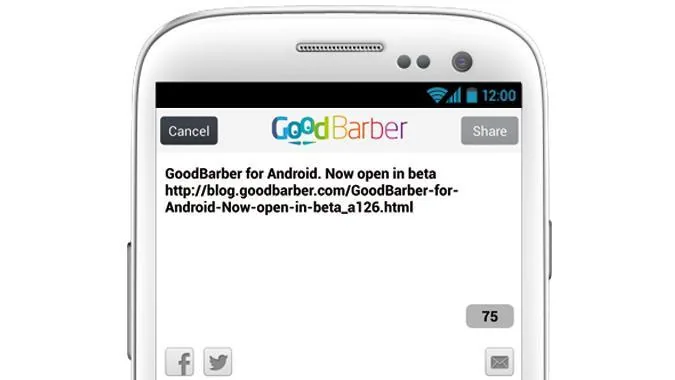
Since last week, [the Android beta is opened](https://www.goodbarber.com/blog/goodbarber-for-android-now-open-in-beta-a126/)[on GoodBarber](https://www.goodbarber.com/blog/goodbarber-for-android-now-open-in-beta-a126/). You probably noted that new options have appeared in your backend: in expert mode, you can now upload a specific icon and a specific splash screen for your Android app.
In order to set up properly the sharing options in your app, **you need to set up a new parameter** in the Facebook and Twitter apps you have already created.
Here is a little summary of the modifications you have to apply to your social apps if you have already created them.
## Facebook
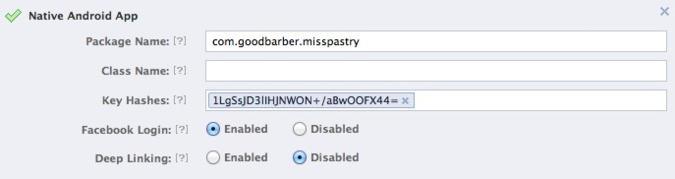
When creating the Facebook app that is used on your iPhone app, you have set it as "Native iOS app". You guess that now that you also have a **Native Android app**, the settings should reflect it :)
So, go on , click on the **Apps** tab, and find your app. Here, click on the "Edit app" button, and choose the "Native Android app" option.
You have to enter 2 values :
- Package name
- Key hashes
These ones can be found in your GoodBarber backend, on the **Design > App options > Facebook** page.
Be also sure to have the **Facebook Login** line set to "Enabled".
The whole Facebook app creation process is also described in your GoodBarber backend's online help, or on the [GoodBarber portal](https://www.goodbarber.com/help/authentication-and-users-groups-r102/facebook-authentication-1-2-register-as-a-facebook-developer-a89/) .
## Twitter
For your Twitter app, things will be easier :)
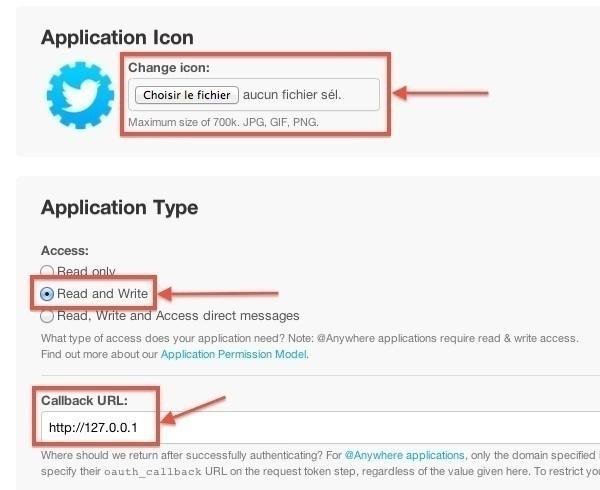
Go to , open your app settings, and click on the Settings tab.
If it's not already done, you can upload an icon for your Twitter app. You should!
Then, enable the **Read and Write** option and enter the following Callback URL: **http://127.0.0.1**
And it's done :)
The whole Twitter app creation process is also described in your GoodBarber backend's online help, or on the [GoodBarber portal](https://www.goodbarber.com/help/facebook-and-twitter-r43/twitter-a32/) .
- [#Android app](https://www.goodbarber.com/blog/tags/android%20app)
- [#Connector](https://www.goodbarber.com/blog/tags/connector)
- [#Facebook](https://www.goodbarber.com/blog/tags/facebook)
- [#Social media](https://www.goodbarber.com/blog/tags/social%20media)
Alex Brooks
Unlock more content
View a short ad
Site-wide access for 24 hours